

7 Fatal AI Image Prompting Mistakes Graphic Designers Must Avoid

Hello Visual Thinkers!
The dawn of AI in graphic design has ushered in an era of unprecedented creativity and efficiency, promising to revolutionize how we conceive and produce visual content. From generating complex scenes to iterating on branding elements, artificial intelligence offers a powerful co-pilot for designers worldwide. However, this transformative power comes with a steep learning curve. Many designers, eager to harness AI’s potential, often find themselves staring at outputs that are far from their vision—sometimes even bordering on the bizarre or incoherent. This frustration often stems from fundamental AI image prompting mistakes.
It’s easy to assume that AI, being intelligent, will instinctively understand our creative desires. Yet, the reality is that AI models are incredibly literal, interpreting our textual cues with a precision that demands clarity, specificity, and a nuanced understanding of their operational logic. Without a deliberate approach to prompt engineering, designers risk falling into common pitfalls that lead to what we affectionately call “horrible art”—generically bland, distorted, or utterly nonsensical images.
This article is your essential guide to navigating the complexities of AI image generation. We will uncover the 7 fatal AI image prompting mistakes that commonly plague graphic designers, explaining why these errors occur and, more importantly, providing actionable strategies to overcome them. By mastering the art and science of prompt engineering, Visual Thinkers can transform their AI interactions, elevating their designs from accidental absurdities to stunning, purposeful visuals that truly stand out. Let’s dive in and unlock the full potential of your AI creative partner!


I. The Rise of AI in Graphic Design: A Double-Edged Sword
Artificial Intelligence has rapidly integrated itself into almost every facet of modern technology, and graphic design is no exception. Tools like Midjourney, DALL-E, and Stable Diffusion have democratized image creation, allowing designers to conjure intricate visuals with mere text commands. This innovation promises to free designers from repetitive tasks, accelerate brainstorming, and unlock novel creative avenues previously unattainable. Imagine generating dozens of conceptual variations for a logo in minutes, or visualizing complex architectural renderings without ever opening a 3D modeling software. The potential for increased productivity and imaginative exploration is immense, making AI an indispensable asset for the forward-thinking graphic designer.
However, like any powerful tool, AI image generation is a double-edged sword. Its effectiveness is directly proportional to the skill of its operator—the prompt engineer. Without a deep understanding of how these models interpret language, designers can quickly become disillusioned. The allure of instant masterpieces often clashes with the reality of wrestling with abstract algorithms, leading to outputs that are far from the desired result. The true power of AI isn’t in its ability to create autonomously, but in its capacity to extend human creativity when guided with precision and expertise. This is where understanding and avoiding common AI image prompting mistakes becomes not just beneficial, but absolutely critical.
II. Fatal Error #1: Vague and Ambiguous Prompts – The ‘Garbage In, Garbage Out’ Trap
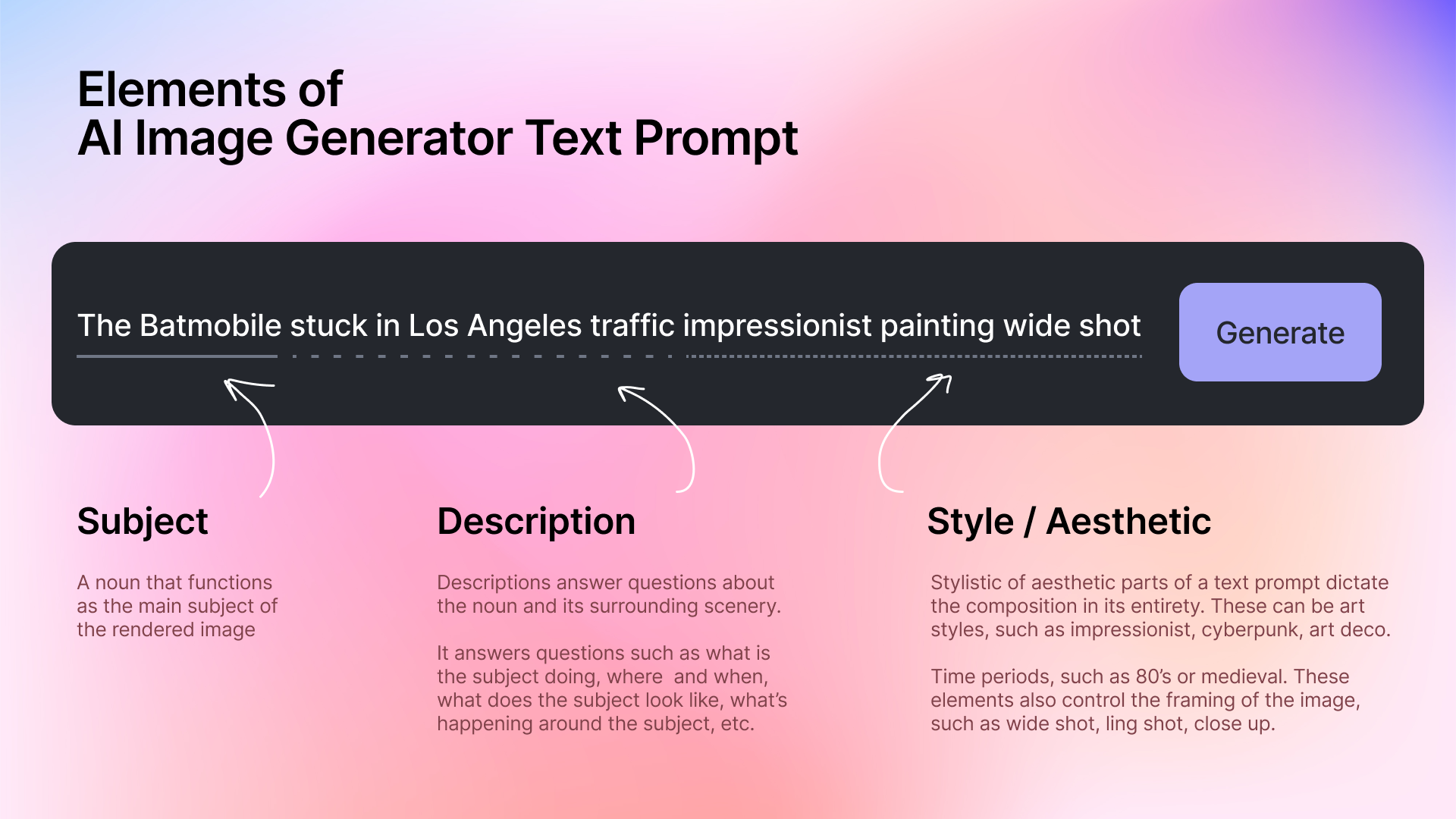
One of the most pervasive AI image prompting mistakes is the reliance on vague and ambiguous language. AI models, despite their sophistication, are fundamentally literal interpreters of text. They lack intuition and context that a human designer would possess. When you provide a prompt like “a beautiful landscape,” the AI is left to guess. What constitutes “beautiful”? Is it a mountain, a beach, a forest, or an alien planet? What time of day? What artistic style? The result is almost always generic, uninspired, or a haphazard combination of elements that barely resemble a cohesive vision.
This is the classic “garbage in, garbage out” scenario. If your input lacks specificity, your output will inevitably reflect that lack of clarity. For instance, instead of “a beautiful landscape,” consider “a hyperrealistic digital painting of a serene sunset over a jagged mountain range, with an alpine lake reflecting the vibrant orange and purple sky, dramatic volumetric lighting, wide-angle lens, detailed foreground of pine trees and mossy rocks.” The latter prompt leaves no room for ambiguity, guiding the AI to generate precisely what is envisioned. Designers must shift their mindset from simply describing a concept to explicitly instructing the AI on every significant visual component, style, mood, and compositional detail.

III. Fatal Error #2: Over-Prompting – Drowning the AI in Unnecessary Details
While specificity is crucial, another common **AI image prompting mistake** lies at the opposite end of the spectrum: over-prompting. It might seem counterintuitive, but bombarding an AI with an excessive number of details, especially if they are redundant, contradictory, or poorly structured, can be just as detrimental as being too vague. When a prompt becomes a sprawling paragraph of loosely connected ideas, the AI can get confused, struggling to prioritize elements and synthesize them into a coherent whole. This often leads to cluttered compositions, incoherent visual narratives, or images where crucial details are overlooked in favor of minor, less important ones.
The problem with over-prompting is that it doesn’t necessarily add clarity; it adds noise. Imagine telling a human artist to paint “a red apple, a green apple, a blue apple, a yellow apple, a purple apple, and a striped apple on a wooden table, in a basket, next to a vase of flowers, with a cat sleeping underneath, and a window in the background, but also a stormy sky, and a rainbow, and a UFO, in the style of Van Gogh, but also Picasso, and a photograph.” The result would be a chaotic mess. AI models, similarly, can struggle to reconcile too many disparate elements or conflicting stylistic instructions. The key is to be descriptive, yes, but also concise and hierarchical, focusing on the most impactful elements first and then adding supporting details strategically, rather than exhaustively.

IV. Fatal Error #3: Ignoring the Power of Negative Prompts – What NOT to Generate
Many Visual Thinkers, especially those new to AI image generation, focus solely on what they *want* to see in their output. However, a critical **AI image prompting mistake** is neglecting the equally powerful concept of negative prompts. A negative prompt is an instruction to the AI about what *not* to include or what characteristics to avoid. This feature is invaluable for refining results, eliminating common artifacts, and steering the AI away from undesired interpretations.
Think of it as sculpting: positive prompts add clay, while negative prompts carve away the excess. For instance, AI models sometimes struggle with generating anatomically correct hands or faces, or they might introduce unwanted text, blurry elements, or a specific aesthetic you’re trying to avoid. By adding negative prompts such as “deformed, ugly, tiling, poorly drawn hands, poorly drawn feet, poorly drawn face, out of frame, extra limbs, disfigured, bad anatomy, blurred, watermark, grainy, signature, cut off, low contrast, underexposed, overexposed, bad art, beginner, amateur, distorted,” you explicitly tell the AI to avoid these common pitfalls. This proactive approach to exclusion is crucial for achieving clean, professional, and visually accurate results, significantly reducing the iteration time spent fixing minor but distracting errors.
V. Fatal Error #4: Lack of Artistic Direction and Style – Generic Visuals Syndrome
One of the most frustrating AI image prompting mistakes for graphic designers is consistently generating images that feel generic, bland, or lacking a distinctive artistic flair. This is often due to a failure to provide adequate artistic direction and stylistic cues within the prompt. AI models are trained on vast datasets of images, encompassing every conceivable artistic style, era, and medium. Without explicit instructions, they tend to default to a generalized, often photorealistic or conventionally digital style, which might not align with a designer’s specific aesthetic goals or client branding.
To move beyond “generic visuals syndrome,” Visual Thinkers must become adept at communicating desired artistic styles, moods, lighting conditions, and aesthetic preferences. Instead of just describing the subject, describe *how* it should look. Incorporate terms like “cinematic lighting,” “watercolor painting,” “neo-futurism,” “steampunk aesthetic,” “minimalist design,” “abstract expressionism,” “chiaroscuro,” or “pastel colors.” Specify textures, depth of field, color palettes, and even the emotional tone (e.g., “somber mood,” “joyful vibrancy”). By infusing your prompts with rich artistic vocabulary, you empower the AI to tap into its extensive knowledge base and produce unique, branded, and visually appealing designs that truly resonate with your creative vision. This level of detail transforms a simple request into a well-defined artistic brief.

VI. Fatal Error #5: Neglecting Iteration and Refinement – One-Shot Wonders are Rare
Many designers approach AI image generation with the expectation of achieving a perfect result on the first attempt, clicking the generate button once and hoping for a masterpiece. This critical **AI image prompting mistake** disregards the fundamental nature of prompt engineering: it is an inherently iterative and experimental process. Just as traditional design workflows involve sketches, drafts, and multiple revisions, AI prompting requires continuous adjustment, learning, and refinement to progressively align the AI’s output with your vision. Expecting a one-shot wonder is setting yourself up for disappointment and inefficiency.
Successful AI artists understand that each generated image is a data point, offering insights into how the AI interprets specific keywords and stylistic cues. They treat initial generations as starting points, carefully analyzing what worked, what didn’t, and why. This involves making small, controlled changes to the prompt – perhaps adjusting a single keyword, adding a negative prompt, or experimenting with different weights – and observing the impact on subsequent generations. This systematic approach allows designers to incrementally guide the AI, honing in on the desired aesthetic and composition. Embrace the process of trial and error; it’s not a sign of failure but a testament to effective prompt engineering. Learning to iterate efficiently is key to transforming rough concepts into polished, high-quality visuals.
VII. Fatal Error #6: Overlooking Technical Specifications – Aspect Ratios, Resolution, and Beyond
One of the more practical yet often overlooked AI image prompting mistakes involves neglecting crucial technical specifications. While the artistic and conceptual elements of a prompt are paramount, the technical parameters dictate the usability and final presentation of the generated image. An otherwise perfect visual can be rendered useless if it’s generated with an incorrect aspect ratio, insufficient resolution, or an unsuitable camera angle for its intended application.
For graphic designers, these technical details are non-negotiable. Consider the aspect ratio: a prompt for a web banner might require a 16:9 ratio, while an Instagram post needs 1:1, and a portrait-oriented poster demands a 2:3 or 9:16. Failure to specify this can result in awkwardly cropped or stretched images that require extensive post-processing, defeating the purpose of AI efficiency. Similarly, resolution matters; an image destined for print needs a much higher DPI than one for web use. Beyond these basics, incorporating camera-specific terms like “wide-angle lens,” “telephoto shot,” “bokeh effect,” “depth of field,” or “cinematic lighting” can dramatically influence composition, perspective, and overall visual quality, ensuring the AI output is not only aesthetically pleasing but also technically sound and fit for purpose.
VIII. Fatal Error #7: Expecting Perfection on the First Try – The Myth of Instant Masterpieces
Perhaps the most widespread underlying **AI image prompting mistake** is the misconception that AI is a magic button capable of delivering instant, flawless masterpieces with minimal effort. This expectation, fueled by impressive AI showcases and headlines, often leads to quick frustration when initial attempts don’t yield perfect results. It’s crucial for Visual Thinkers to temper these expectations and recognize that AI image generation, while powerful, is a tool that augments human creativity, rather than replaces it. It is not an oracle that divines your unexpressed desires but a sophisticated algorithm that executes your explicit instructions.
True mastery of AI image generation involves patience, a willingness to experiment, and an understanding that the process is often a dialogue between human intent and algorithmic interpretation. Designers should view AI as a highly skilled intern who needs clear, consistent, and iterative feedback to learn and improve. Embrace the occasional bizarre output as a learning opportunity to refine your prompts. The journey from a basic idea to a refined visual requires multiple generations, prompt tweaks, and a keen eye for what works and what doesn’t. Dispelling the myth of instant perfection will free you to engage with AI more effectively, fostering a creative workflow that is both productive and genuinely rewarding.
IX. Mastering the Art of Prompting: Essential Tips for Graphic Designers
Avoiding the common AI image prompting mistakes is the first step; the next is proactively adopting best practices to become a true prompt engineering maestro. Here are essential tips for Visual Thinkers to elevate their AI-generated designs:
A. The ‘5 Ws and 1 H’ Approach: Who, What, When, Where, Why, and How to structure your prompts for clarity.
Apply journalistic principles to your prompts. Define the Who (subject/character), What (action/object), When (time of day/era), Where (setting/environment), Why (mood/purpose), and How (style/lighting/composition). For example, “Who: a young woman, What: reading a book, When: at dawn, Where: in a cozy cafe, Why: evoking tranquility, How: in the style of a soft impressionistic painting with warm, diffused light.” This structured approach ensures comprehensive detail.
B. Leverage Modifiers and Keywords: Using descriptive adjectives, verbs, and artistic terms to enhance detail.
Expand your vocabulary beyond basic descriptors. Instead of “big tree,” use “towering ancient oak.” Replace “walking” with “striding, strolling, meandering.” Incorporate artistic movements (e.g., “Art Deco,” “Surrealism”), photographers (e.g., “Ansel Adams style”), or cinematographic terms (e.g., “anamorphic lens flare,” “deep focus”). A rich vocabulary provides the AI with more precise guidance.
C. Utilize Structured Prompting: Employing parentheses, weights, and specific syntax for advanced control.
Many AI models support advanced syntax to prioritize or de-emphasize elements. Parentheses `()` or brackets `[]` can often increase or decrease the ‘weight’ of a term (e.g., `(vibrant colors)` to emphasize, `[monochrome]` to de-emphasize). Commas act as separators for distinct concepts, while colons `:` or double colons `::` might denote weights. Consult your specific AI tool’s documentation for its unique syntax to gain finer control over the output.
D. Learn from Examples: Analyzing successful prompts and reverse-engineering desired styles.
Don’t reinvent the wheel every time. Explore communities like PromptBase, Lexica, or even social media groups dedicated to AI art. Study the prompts behind images you admire. Dissect them to understand how they achieved specific effects. Reverse-engineering successful prompts by identifying key modifiers, stylistic cues, and structural elements will rapidly expand your own prompting toolkit.
E. Test and Iterate Systematically: Making small, controlled changes to prompts to understand their impact.
As mentioned, iteration is key. When refining a prompt, change only one or two variables at a time (e.g., a color, a lighting condition, or a style modifier). Generate multiple variations and compare the results. This systematic testing allows you to isolate the impact of each prompt element, building an intuitive understanding of how your AI tool responds to different inputs. Keep a log of your successful and unsuccessful prompts for future reference.
Visual Conclusion
The journey into AI image generation is undoubtedly exciting, offering a potent extension to the graphic designer’s toolkit. However, the path to breathtaking visuals is often paved with learning from the inevitable missteps. By understanding and actively avoiding these 7 fatal AI image prompting mistakes—from vague descriptors and over-prompting to neglecting negative prompts and technical specifications—Visual Thinkers can transform their experience from frustrating hit-or-miss attempts into a streamlined, creatively empowering process. Embrace prompt engineering not as a chore, but as an art form itself, demanding clarity, precision, and an iterative mindset.
Mastering the dialogue with AI unlocks a realm of unparalleled creative potential, allowing you to generate stunning, unique, and perfectly tailored visuals that elevate your design projects. The future of graphic design is collaborative, with AI standing ready as your most powerful assistant. It’s time to communicate effectively, refine tirelessly, and create without limits. For further insights or to discuss your visual design needs, don’t hesitate to Contact Us. Want to explore more cutting-edge design perspectives? Visit More Visual.
7 Common AI Image Prompting Mistakes & How to Fix Them for Better AI Art
More Visual References
Discover more from CiptaVisual
Subscribe to get the latest posts sent to your email.